Download the datasets
Follow the instruction below:
- Create a new folder for this course (e.g.,
R_summer_2024). - In this course, we mostly use the data from websites and the data attached to R packages but we will occasionally use additional data that I will provide. Please download the datasets from this link .
- Once you open the link, click on the
Downloadbutton at the top. It will ask you to login or sign up. At the bottom of this window, please click “Or continue with download only” to download the file.
- Once you open the link, click on the
- After unzipping the file, it will automatically create a folder named
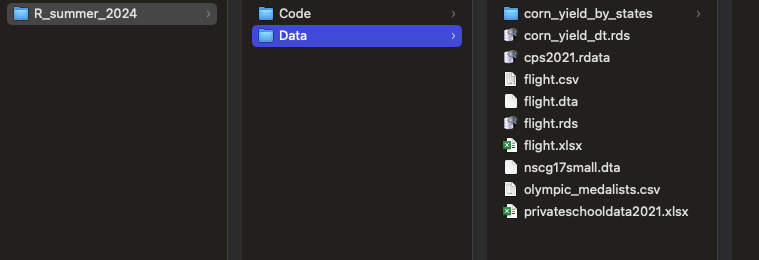
Data. Move this folder to yourR_summer_2024folder. - Additionally, inside of your
R_summer_2024folder, you need to create a folder namedCode. - Now you’re ready to begin!
Your R_summer_2024 folder should look like this: